Marco's Pizza
4.95.01KReviews
Analysis ByAppCompare
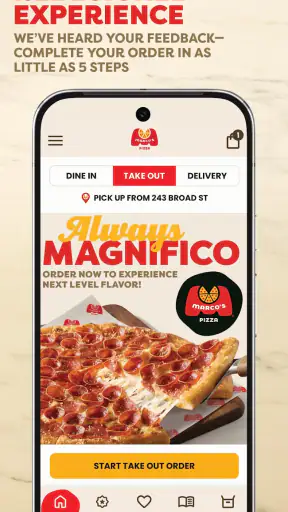
I found Marco's Pizza most useful when I wanted to turn a pizza order into a quick, focused task rather than a long browsing session. It is a free Food & Drink app from Marco's Franchising, LLC, built around ordering from a phone. The experience is straightforward: open it when you are hungry, choose what you want, review the order, and move toward checkout without having to work through a full restaurant website in a small browser window.
That simplicity is the main appeal, but it also defines the app’s limits. This is not a general meal-planning tool, a restaurant discovery service, or a replacement for every delivery option. Its value depends on whether Marco’s Pizza is available where you are and whether your phone has a reliable connection when you need to browse the menu and submit an order. In my experience, it makes the most sense for people who already know they want Marco’s and prefer a dedicated mobile ordering route.
How the app feels when ordering depends on your connection
The first thing I noticed is how much of the experience is tied to being online. The app needs to communicate with the restaurant’s ordering system while you move through the process, so a strong connection makes the whole visit feel much more natural. Menu browsing, location-related steps, customization, and checkout all work best when the app can respond promptly instead of waiting for a weak mobile signal.
That matters more than it might sound. Ordering food is usually a short, time-sensitive activity. I may be standing outside a store, sitting in a car before heading home, or trying to place an order while other people are waiting for me to decide. A slow connection turns small pauses into uncertainty: did the menu load, did the selection register, or is the screen simply thinking? The app is at its best when I treat it as a connected ordering counter rather than something I can casually prepare without network access.
I would open it before I reach the checkout stage if I were using mobile data in a crowded place. Restaurant ordering is not the ideal moment to discover that a public network requires another login or that reception drops inside a building. The practical habit is simple: choose a stable connection when possible, keep the app open while completing the order, and avoid switching repeatedly between apps during the final steps.
The strong public response suggests that this focused approach works for many diners. Marco’s Pizza carries an average rating of 4.9 from around 11 thousand ratings, with roughly 5 thousand written reviews and more than 1 million installs. Those figures do not mean every order will be effortless, because the restaurant, location, device, and connection still matter, but they do show that the app has found a large audience for its basic purpose.
What changes between Wi-Fi and mobile data
On dependable Wi-Fi, I can take a little more time comparing choices and checking the basket before submitting. On mobile data, I prefer a more deliberate workflow: decide the order first, make only the necessary changes, and inspect the final summary carefully. This is not because the app is difficult, but because a connection interruption is more frustrating when the order is nearly complete.
A useful trick is to avoid tapping repeatedly when a screen takes a moment to react. Repeated taps are easy to make when the network is slow, and they can create uncertainty about whether a choice was applied once or more than once. I wait for the interface to settle, then review the basket rather than assuming the last tap behaved as intended. That small pause is especially worthwhile when changing toppings or quantities.
The app is also better suited to a planned order than to constant menu exploration while moving. If I am walking through a busy area, riding in a car, or moving between indoor and outdoor coverage, I would rather decide where I am ordering from first and then complete the transaction after the connection stabilizes. The fewer network changes during checkout, the easier it is to tell whether a problem came from the app or from the signal.
Mobile situations where it earns its place
The clearest everyday use case is a group arriving home at different times. I can place the order from my phone while commuting, then review the basket before everyone starts asking what was selected. That is more convenient than passing a laptop around or attempting to use a restaurant website with several browser tabs open. The app keeps the task centered on the phone I already have in my hand.
It also works well for repeat decision-makers who do not want to start from a search engine every time. If I already know I want Marco’s, opening the dedicated app removes the extra steps of finding the restaurant online, identifying the correct location, and navigating a mobile webpage. That is a modest advantage, but it becomes noticeable when I order in the same kind of situation repeatedly.
Another useful context is ordering from a place where speaking on the phone would be inconvenient. A quiet office, a waiting room, or a shared room can make a visual ordering flow preferable. I can check the details myself instead of trying to hear a staff member over background noise. The trade-off is that I become responsible for reading every selection carefully, so the app rewards attention rather than rushed tapping.
For families, the phone format can be helpful because the person placing the order can show the basket to others before submitting it. That is a practical way to catch a missing item or an unwanted change. I would still confirm the final order aloud if several people contributed, since a small screen can make a long customized order easy to misread.
Where it is less convenient than alternatives
The dedicated app is not automatically better for every customer. If I am comparing several nearby restaurants, a general delivery service may be more convenient because it puts multiple menus in one place. If I need broader restaurant discovery, the Marco’s app is intentionally narrower. It is designed around ordering from this brand, not around helping me decide which cuisine or restaurant to choose.
A restaurant website can also be the better option when I am already using a computer and want a larger screen. Reading a long order, checking details, or coordinating a meal for many people may feel easier with more space. The app wins when speed and phone access matter; the website or a broader ordering service may win when comparison and screen size matter more.
Calling the restaurant remains a reasonable alternative for someone who prefers human confirmation or has an unusual request that is difficult to express through a standard ordering flow. The app is strongest when the order fits the choices presented on screen. I would not choose it simply because it is an app if my priority were discussing a special situation directly with staff.
Handling interruptions, errors, and uncertain order status
Connectivity problems are most stressful at the end of an order. If the app pauses after I submit, I do not immediately press the button again. The safer recovery habit is to check whether the order appears to have advanced, look for any confirmation shown in the app, and verify the basket or order area before attempting another submission. Duplicate orders are a bigger problem than waiting a few seconds.
If the connection disappears while I am still selecting items, I would pause rather than rebuilding the order repeatedly. A temporary signal loss can make the screen look incomplete even though the app is still trying to respond. Closing and reopening the app may be a sensible next step after the connection returns, but I would first make a note of what I selected so I can compare the basket instead of relying on memory.
The same principle applies when moving from Wi-Fi to mobile data. I prefer to finish one connection change before continuing. Switching networks in the middle of checkout can make it difficult to know whether a delay is caused by the app, the restaurant system, or the phone’s connection. Waiting until the signal is stable gives me a clearer recovery path and reduces the temptation to submit twice.
When an order is time-sensitive, I would leave enough room to recover from a failed attempt. The app can simplify the ordering process, but it cannot remove the uncertainty created by a poor signal or a busy restaurant system. I see it as a faster channel, not a guarantee that every transaction will complete instantly.
Using it without wasting mobile data
This is not an app I would worry about using for a normal order, but data-conscious users can still make the process more efficient. I would browse the menu while connected to trusted Wi-Fi, decide on the order, and use mobile data mainly for the final steps if necessary. That approach also makes the process less vulnerable to changing reception because most of the decision-making happens before I leave the stronger connection.
It helps to avoid opening and closing the app repeatedly while comparing choices. Repeated reloads can make a short task feel longer and may use more data than simply keeping the current session open. I also prefer to review the basket once at the end instead of jumping back and forth through the menu after every small change.
People with limited data plans should be especially careful about multitasking during checkout. Streaming video, cloud backups, and other background activity can compete with the ordering session. I would pause unnecessary downloads, keep the phone awake long enough to finish, and avoid relying on a weak public network that may disconnect without warning.
These habits are not special features of the app; they are practical ways to make a connected ordering tool behave more predictably. The key insight is that the best data-saving strategy is usually preparation: decide what you want while connected to Wi-Fi, then use the app for the short transaction rather than for extended browsing on a cellular connection.
Who should install it and who should skip it
I would recommend it to regular Marco’s customers, families placing pickup or delivery orders from a phone, and anyone who values a direct brand-specific route over comparing multiple restaurants. The free price removes the main barrier to trying it, and the Everyone content rating makes it suitable for a broad household audience. Its current version is 3.0.4, and it supports devices running at least OS 9, which is useful for people who keep an older phone in service.
I would skip it if I rarely order Marco’s, if I mainly want to compare restaurants, or if my connection is unreliable whenever I need to place an order. In those cases, a browser, a broader delivery platform, or a phone call may fit better. I would also think twice if I expect extensive help with unusual requests; a dedicated ordering interface is convenient precisely because it keeps the process structured.
Marco's Franchising, LLC has kept the app’s purpose clear: it is a mobile ordering tool, not a complicated food-service hub. That focus is a strength when I know what I want. It is a weakness when I am undecided, need broad comparison, or want a conversation before committing to the order.
My final view on the connected experience
After using it as a practical ordering app, I see the biggest benefit in the reduced distance between deciding to order and reaching the checkout stage. The experience feels most dependable when I start with a stable connection, avoid frantic repeated taps, and verify the basket before submitting. Those habits matter because the app’s convenience is closely linked to network responsiveness.
My main recommendation is to treat Marco’s Pizza as a connected ordering shortcut, not an offline preparation tool. Use Wi-Fi when you want to browse calmly, use mobile data for a focused order when needed, and allow a little time to recover if the signal drops. For a known Marco’s customer, that is a sensible trade-off and an easy way to order from a phone.
It will not replace a multi-restaurant service or a direct conversation for every situation, but it does not need to. When the restaurant is the choice already made, the app keeps the process simple and mobile. That focused role, combined with its free availability and broad device support, makes it worth trying for anyone who orders from Marco’s often enough to value a dedicated route.
FAQ
What is Marco’s Pizza, and what can I do with the app?
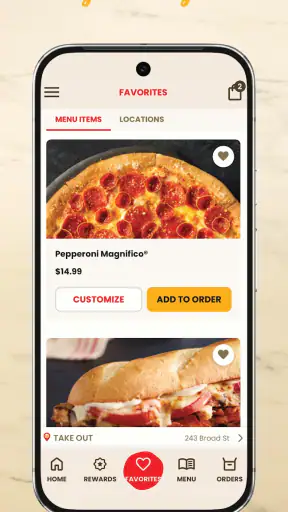
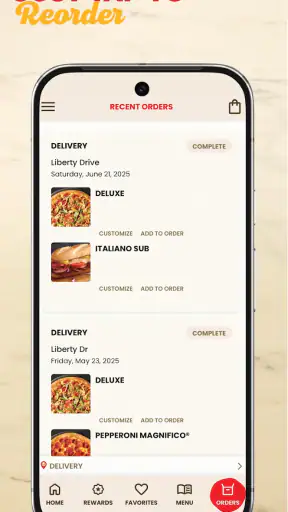
Marco’s Pizza is the official ordering app for the Marco’s Pizza restaurant chain. After installing it, you can browse the menu, customize pizzas and other items, choose delivery or carryout, select a nearby location, apply available deals, and place an order. The exact features, menu items, prices, delivery availability, and promotions may vary by restaurant and location.
Can I order Marco’s Pizza for delivery or carryout through the app?
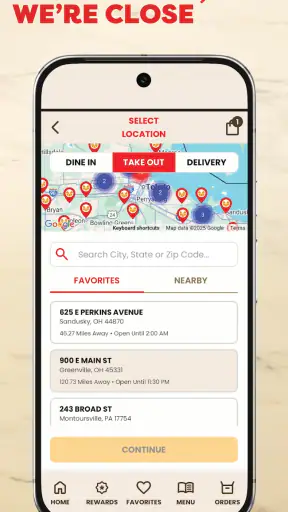
Yes, the app generally allows you to choose between delivery and carryout when ordering from a participating Marco’s Pizza location. You enter your address or select a restaurant, review the estimated preparation or delivery time, and add your preferred items. Delivery areas, fees, minimum order requirements, and pickup options can differ, so check the details shown for your selected store before confirming.
Does the Marco’s Pizza app offer coupons, discounts, or rewards?
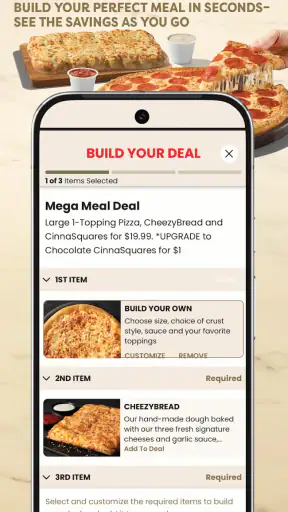
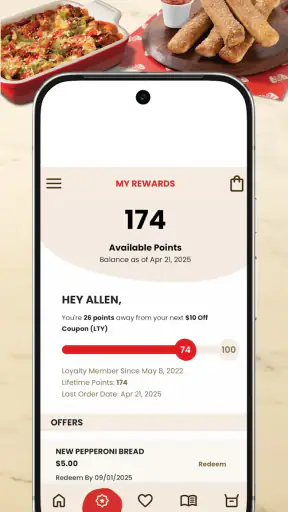
Marco’s Pizza frequently provides digital coupons, limited-time specials, and promotional deals through its app or ordering platform. Available offers can depend on your location, order type, selected products, and the participating store. Some promotions may have restrictions, expiration dates, or exclusions, and not every coupon can be combined with another offer. Always review the terms before submitting your order.
How can I customize pizzas and manage special requests in the app?
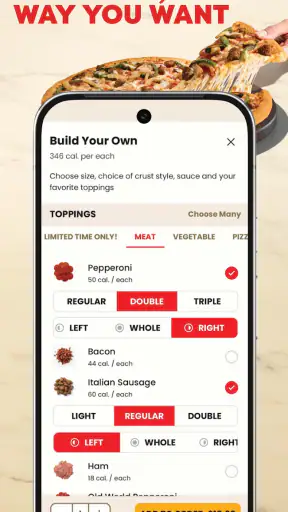
When building an order, you can usually select a pizza size, crust, sauce, cheese, toppings, and other available options. The app displays the price as you customize the item, helping you understand the total before checkout. Special instructions may be available for certain orders, but they are not guaranteed. Carefully review every item, topping, quantity, and request before paying.
Is the Marco’s Pizza app available everywhere, and what should I check before downloading?
The app’s availability and functionality may depend on your country, device, operating-system version, and proximity to a participating Marco’s Pizza restaurant. Before downloading, check that the publisher is the official Marco’s Pizza company, review the required permissions, and confirm that your local store supports online ordering. Menu prices, service fees, payment methods, and delivery coverage should also be verified in the app.
Pros
- Easy online ordering through the app.
- Convenient menu browsing with pizza customization options.
- Multiple payment methods make checkout simple.
- Store locator helps find nearby Marco’s Pizza locations.
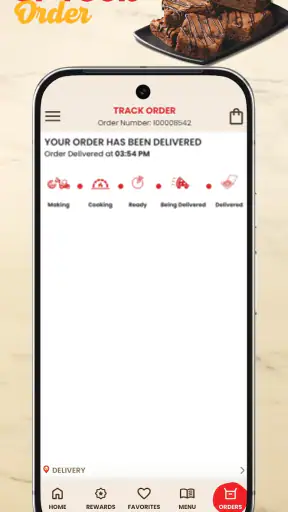
- Order tracking keeps you updated on delivery progress.
Cons
- Delivery availability and fees vary by location.
- Some deals may require specific menu items or sizes.
- App performance can depend on your local store.
- Customization options may differ between locations.
- Promotional prices may change or expire without notice.